
Norton AntiVirus Plus: what the entry-level tier actually includes
Some links below are partner links, each labelled Partner link. If you buy after following one, COSMOS CLUB s.r.o. receives a commission from the vendor's affiliate programme. You pay exactly the same price either way.
The commission does not decide what this page says. Where the product lacks a feature that is commonly assumed to be in it, that is stated plainly below. We publish no ratings, no star scores and no reader testimonials — see our editorial policy.
Norton AntiVirus Plus is the cheapest tier in Norton's consumer range, and it is also the most frequently misdescribed. A lot of writing about it — including an earlier version of this page — credits it with a VPN it does not contain and a multi-device licence it does not grant. This is what it is, what it is not, and how to decide whether you need it.
What Norton AntiVirus Plus is — and what it is not
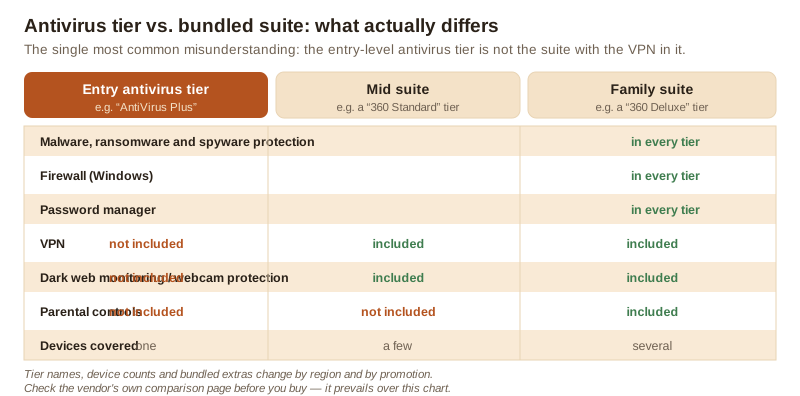
Norton's consumer products are sold as a ladder. Norton AntiVirus Plus sits on the bottom rung. It is the malware-protection product on its own, plus a few extras, licensed for a single device. Above it sit the Norton 360 tiers, which wrap the same protection engine in a bundle: a VPN, dark web monitoring, webcam protection, more cloud backup, and in the family tiers parental controls, across several devices.
At the time of writing, the entry tier is generally described by the vendor as covering one PC or Mac and including malware, spyware and ransomware protection, a Smart Firewall on Windows, Norton's password manager, a small cloud backup allowance on Windows, and the “Virus Protection Promise” remediation commitment. It is not described as including Secure VPN — that is a Norton 360 feature.
This distinction matters more than it sounds, because the VPN is the single most common reason people think they want the product. If a VPN is what you are shopping for, the entry tier is the wrong purchase and you will have to upgrade.
A second thing worth being clear about: none of the tiers, including the most expensive, makes a device immune. Antivirus software raises the cost of attacking you. It does not reduce that cost to zero, and any page that suggests otherwise is selling you something.
Partner linkIf you buy after following this link, COSMOS CLUB s.r.o. earns a commission from the vendor. It costs you nothing extra and the price you pay is unchanged. How this is funded.
How a modern detection engine actually works
The word “antivirus” is a leftover from the 1990s, when the job really was matching files against a list of known viruses. Every mainstream engine today, Norton's included, works in layers, and understanding those layers tells you what the product can and cannot catch.
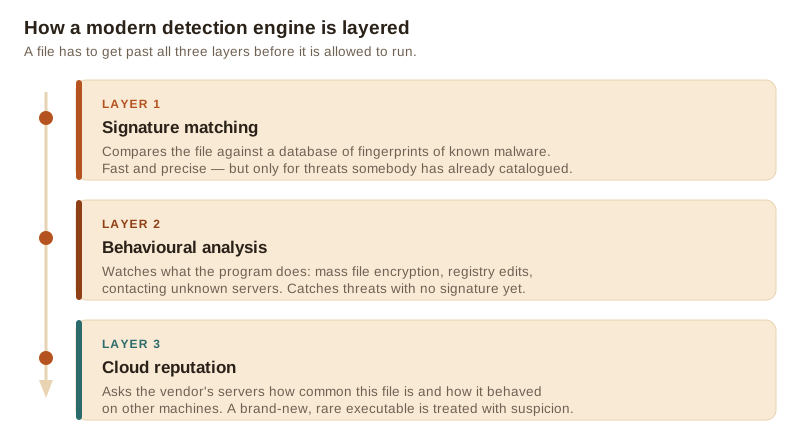
Signature matching
The historical layer. The engine computes a fingerprint of a file and compares it against a database of fingerprints of known malware. It is fast, cheap and close to exact — but by definition it only recognises what somebody has already catalogued. Attackers defeat it trivially by recompiling their payload, which changes the fingerprint.
Behavioural analysis
The layer that actually earns the subscription. Instead of asking “what is this file?” the engine asks “what is this program doing?” A process that starts enumerating your documents folder and rewriting every file in it, disables shadow copies, or injects itself into another process, is behaving like ransomware regardless of whether its fingerprint is known. This is where a paid engine typically differentiates itself, and it is also where false positives come from: legitimate backup and encryption tools do some of the same things.
Cloud reputation
The engine asks the vendor's servers what is known about a file: how many other machines have seen it, how old it is, whether it is digitally signed, how it behaved elsewhere. A signed executable that has been on ten million machines for three years is almost certainly fine. An unsigned executable first seen forty minutes ago on eleven machines is not. This layer is why vendors can react to a new campaign quickly — though how quickly depends on the campaign and on how much telemetry the vendor has, and no vendor can honestly promise a fixed response time.
Real-time protection, step by step
“Real-time protection” means the engine hooks into the operating system's file layer, so a file is examined at the moment it is written or opened, rather than when you remember to run a scan. The practical consequence is that the decision point is before execution, not after.
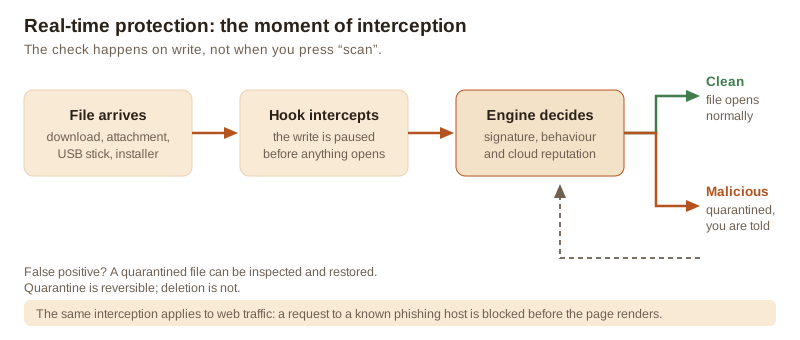
Two details are worth knowing. First, the verdict is quarantine, not deletion — the file is moved somewhere it cannot execute, and you can restore it if the engine was wrong. Second, the same interception logic is applied to web traffic through a browser extension or a network filter, so a request to a host already known for phishing is refused before the page renders. That protection is only as good as the reputation list behind it; a phishing site registered an hour ago may well not be on it yet.
Partner linkIf you buy after following this link, COSMOS CLUB s.r.o. earns a commission from the vendor. It costs you nothing extra and the price you pay is unchanged. How this is funded.
The threats it is designed to stop
“Virus” is a colloquial catch-all covering things that behave very differently and that you notice in very different ways. It is worth knowing which is which, because the symptom that should send you looking is not the same in each case.
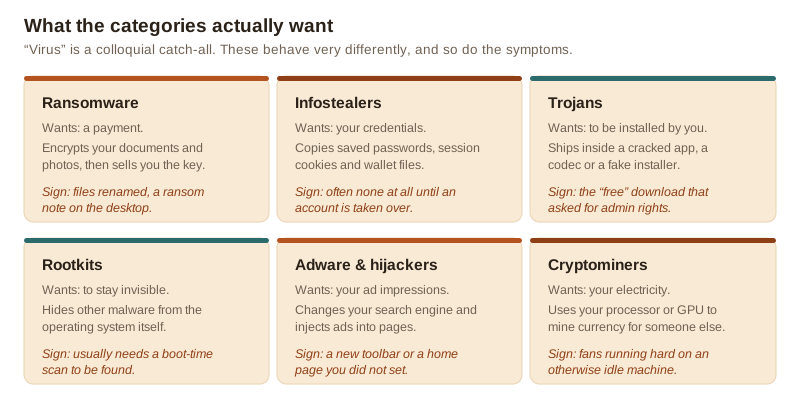
The category that has changed most in the last few years is the infostealer. It does not slow your machine down, does not pop anything up and does not ask for money. It copies your browser's saved passwords and session cookies and leaves. You find out when an account is taken over, which may be months later. This is also the category where a password manager and two-factor authentication do more good than any scanner, because the attack succeeds against the credential, not against the device.
What it does not do
An honest list of the things this product will not do for you:
- It does not include a VPN. That is in the Norton 360 tiers. If the VPN is what you came for, buy the right tier.
- It does not cover your whole household. The entry tier is a single-device licence. A second laptop or a phone needs a different plan.
- It does not stop you handing over your password. No scanner intercepts a phishing page you have decided to trust and typed your credentials into. Web filtering catches known bad hosts, not new ones.
- It does not make you anonymous or private. That is a different product category with different trade-offs, discussed in our guide to public Wi-Fi and VPNs.
- It is not a backup. The small cloud backup allowance on Windows is useful for documents; it is not a substitute for a real backup strategy, and it is the thing that actually saves you from ransomware.
- It cannot promise a detection rate. No engine catches everything, and public test results move between rounds.
How it compares with the protection you already have
Every supported version of Windows ships with Microsoft Defender Antivirus enabled by default, and macOS has XProtect, Gatekeeper and a built-in malware removal tool. Neither is a placeholder any more. Microsoft Defender has scored competitively in the public comparative tests run by AV-TEST and AV-Comparatives for several years, which is a genuine change from a decade ago and a fact that a page selling you an antivirus subscription ought to say out loud.
What a paid product can still add, depending on tier and vendor, is a consolidated interface across platforms, a bundled password manager and VPN, a remediation promise, human support, and features Microsoft does not ship. Whether those are worth a yearly fee is a real question with a real answer for each reader, and the answer is legitimately “no” for a careful user on an up-to-date Windows machine who already uses a password manager.
We do not publish our own detection scores, because we do not run a malware lab and inventing numbers would be worse than publishing none. The two laboratories worth consulting are listed under sources; both publish current results free of charge, and both test far more rigorously than any website comparison chart.
Partner linkIf you buy after following this link, COSMOS CLUB s.r.o. earns a commission from the vendor. It costs you nothing extra and the price you pay is unchanged. How this is funded.
Price, renewal and the thing to check before you click buy
We deliberately do not quote a price on this page. Consumer antivirus is sold on rotating regional promotions, and any figure we printed would be wrong for some readers on the day they read it. The price shown on the vendor's own checkout is the price that counts.
What we will flag is the structure, because it is the same across the whole industry and it surprises people:
- The advertised price is usually a first-term price. The renewal price is typically higher, sometimes substantially. It is normally disclosed, but in small print near the checkout.
- Subscriptions auto-renew by default. If you do not want that, turn it off in the account settings after purchase rather than relying on remembering next year.
- Check the renewal figure, the term length and the refund window before paying, and keep the confirmation email. Under EU consumer law you generally have a 14-day right of withdrawal on distance contracts for digital services, subject to the conditions in the vendor's own terms.
Who it makes sense for — and who can reasonably skip it
It makes sense if you want one paid product covering a single main computer, you value a bundled password manager and a support line, you are not confident judging downloads yourself, or somebody in your household installs a lot of software from places you would rather they did not.
You can reasonably skip it if you run a fully updated Windows or macOS machine, already use a password manager and two-factor authentication, install software only from official stores and vendor sites, and keep real backups. In that case the marginal risk reduction from a paid scanner is small, and your money is better spent on a backup drive.
Buy a higher tier instead if you want the VPN, need to cover phones and tablets as well, or want dark web monitoring and parental controls. The entry tier will not grow into those.
Before you buy: a short checklist
| Check | Why it matters |
|---|---|
| How many devices the licence covers | The entry tier is single-device. A household usually is not. |
| Whether a VPN is included in this tier | It is a suite feature, not an entry-tier feature. |
| Platform limits | Some features, including the firewall and the cloud backup, are Windows-only. |
| The renewal price, not just the first-term price | They are usually different, and only the second one repeats. |
| The refund window and how to cancel auto-renewal | Easier to note now than to find in twelve months. |
Partner linkIf you buy after following this link, COSMOS CLUB s.r.o. earns a commission from the vendor. It costs you nothing extra and the price you pay is unchanged. How this is funded.
How this page was put together
This article is written from the vendor's published product documentation, from the public test methodology and results of AV-TEST and AV-Comparatives, and from public guidance issued by national cyber-security agencies. It contains no testimonials, no ratings, no star scores and no invented figures. Where we could not verify a claim, we either hedged it or removed it. All illustrations on this page are original SVG drawings produced by us for this article; no product screenshots, vendor artwork or stock photography is used.
In case of any divergence between this page and the vendor's own product, pricing or licensing information, the publisher's own information prevails. Product features and plan contents change without notice.
Corrections to the earlier version of this page
An earlier version of this article, published before the review of 22 September 2026, contained claims that were wrong or unsupported. They have been corrected, and we are listing them rather than quietly deleting them:
- “A built-in VPN”. Removed. Secure VPN is a Norton 360 feature; it is not part of the entry-level AntiVirus Plus tier.
- “Protect all your devices with one subscription” and “standard multi-device licence”. Removed. The entry tier is a single-device licence.
- “All three components — antivirus, VPN and password manager — in a single subscription”. Removed for the same reason.
- The claim that the average household cost of a ransomware incident “far exceeds the annual cost of a premium antivirus subscription”. Removed. No source was cited and we could not substantiate the figure.
- “Independent testing labs consistently rank Norton's detection rates at or near the top of the industry”. Replaced. Results vary between test rounds and between laboratories; we now point readers to the laboratories' own current results instead of characterising them.
- “No dark patterns, no aggressive upsells, no nagging upgrade prompts”. Removed. This is a subjective claim about a product we do not run a monitoring programme against.
- “Responds to brand-new threats within minutes”. Hedged. Response time depends on the campaign and the telemetry available; no vendor can guarantee an interval.
- “The most cost-complete option in its price range”. Removed as an unsupported superlative.
- “For the price of a few cups of coffee per month”. Removed. We no longer quote or characterise prices, because they are promotional and regional.
- “Reader Stories” / “reader-submitted story” framing. Removed sitewide. The article is editorial work by a named author, not a reader submission, and presenting it as one was misleading.
If you find something else on this site that is wrong, write to info@novatren.online. Our corrections procedure explains what happens next.
Sources
- Norton product and plan comparison pages, Gen Digital Inc. — us.norton.com/products (the vendor's own documentation; authoritative for what each tier contains)
- AV-TEST Institute, comparative tests of consumer security products — av-test.org (independent laboratory, results published per test round)
- AV-Comparatives, real-world protection and performance tests — av-comparatives.org (independent laboratory, full methodology published)
- ENISA Threat Landscape, European Union Agency for Cybersecurity — enisa.europa.eu (annual analysis of threat categories and trends in the EU)
- UK National Cyber Security Centre, guidance for individuals and families — ncsc.gov.uk (government guidance on passwords, backups and phishing)
- CISA, StopRansomware guidance — cisa.gov/stopransomware (ransomware prevention and response)
- Microsoft documentation on Microsoft Defender Antivirus — learn.microsoft.com (for what ships with Windows by default)
Norton, Norton 360 and Norton AntiVirus Plus are trademarks of Gen Digital Inc. or its affiliates. novatren.online and COSMOS CLUB s.r.o. are not affiliated with, endorsed by, sponsored by or otherwise connected to Gen Digital Inc. This article is independent editorial content funded by partner links, and it is not a substitute for professional security advice.