
Password security basics
The advice most people absorbed — make it complicated, change it often — solved a problem that is no longer the main one. Reuse is.
No partner links on this page. This guide is reference material and carries no commercial links. The site as a whole is funded by partner links on our buyer's guides — see the affiliate disclosure.
The actual failure mode
Attackers rarely sit and guess your password. They take the username and password pairs leaked from some other service's breach and replay them, automatically, at scale, against every large site. This is called credential stuffing, and it succeeds for exactly one reason: the same password was used in more than one place.
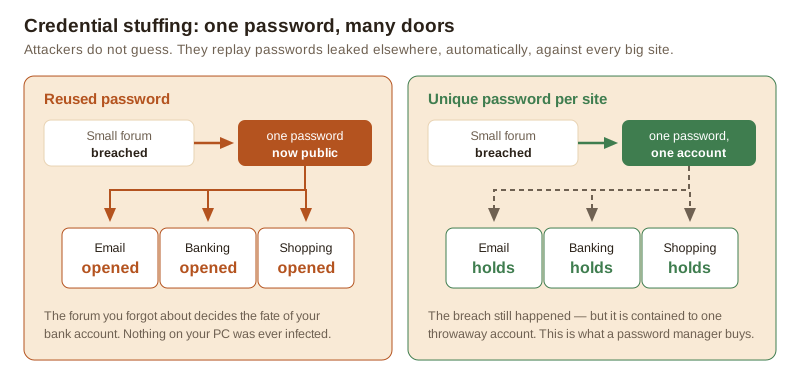
Note what is not happening in the left panel: nothing on the victim's computer was infected. No antivirus product was in a position to intervene, because the attack never touched the device. This is the clearest example of a risk that software you install cannot fix.
What actually helps, in order
1. A different password for every account
This is the whole game. If every password is unique, a breach anywhere costs you exactly one account. It is also impossible to do in your head past about five accounts, which is what the next point is for.
2. A password manager
A password manager generates long random passwords, stores them encrypted behind one strong master password, and fills them in for you. Two benefits people miss:
- It refuses to autofill on the wrong domain. A convincing phishing page does not get the password, because the manager sees that the domain does not match. That is anti-phishing protection you get without having to be alert.
- It removes the incentive to reuse. The reason people reuse is memory, and the manager removes the memory requirement.
The master password should be long and unique, and it should be written down and kept somewhere physically safe if that is what it takes for you not to lose it. A written master password in a drawer at home is a far smaller risk than one reused password across forty sites.
3. Two-factor authentication on what matters
Two-factor authentication means a stolen password is not enough on its own. Priority order: your email account first — whoever controls it can reset everything else — then banking, then anything holding money or personal data.
The methods are not equal. An authenticator app, or better a hardware security key or a passkey, is resistant to phishing in a way that SMS codes are not: a code read aloud or typed into a fake page is a code the attacker now has. SMS is still much better than nothing, and if it is the only option offered, use it.
4. Length over punctuation
For anything you must remember, several unrelated words are stronger and far easier to recall than a
short string with symbol substitutions. correct-battery-staple-harbour beats
P@ssw0rd! comfortably. Modern guidance from NIST and the NCSC has moved away from forced
complexity rules and from routine expiry, because both push people towards predictable patterns.
5. Stop rotating passwords on a schedule
Changing every password every ninety days for no reason produces Summer2026! followed by
Autumn2026!. Change a password when there is a reason: a breach notification, a shared
device, a suspicion. Otherwise leave a strong unique password alone.
Passkeys, briefly
Passkeys replace the password with a key pair bound to the site: the private half never leaves your device and there is nothing to type, so there is nothing to phish and nothing to leak in a breach. Support is now broad across major platforms and growing among large services. Where a site offers one, it is a straightforward improvement. It will be years before you can drop passwords entirely, so the manager stays.
Check whether you are already exposed
Have I Been Pwned lets you enter an email address and see which known breaches include it, free and without an account. If your address appears in a breach, change the password for that service and for anywhere you reused it. Treat the result as a prompt to act, not as a verdict on your security.
Sources
- NIST Special Publication 800-63B, Digital Identity Guidelines — authentication and password guidance: pages.nist.gov
- UK National Cyber Security Centre, password guidance: ncsc.gov.uk
- Have I Been Pwned, breach search: haveibeenpwned.com
- FIDO Alliance, passkeys: fidoalliance.org