
Public Wi-Fi and VPNs: what actually changes
A VPN is a useful tool that is sold with claims it cannot support. Here is the honest version of what it does on a cafe network.
No partner links on this page. This guide is reference material and carries no commercial links. The site as a whole is funded by partner links on our buyer's guides — see the affiliate disclosure.
Start with what HTTPS already does
The threat model that sold VPNs to consumers — somebody on the same network reading your webmail as it goes past — was largely closed by the move to HTTPS everywhere. Essentially all significant sites are now encrypted in transit, browsers warn loudly when a page is not, and the contents of your session are unreadable to anyone on the network in between.
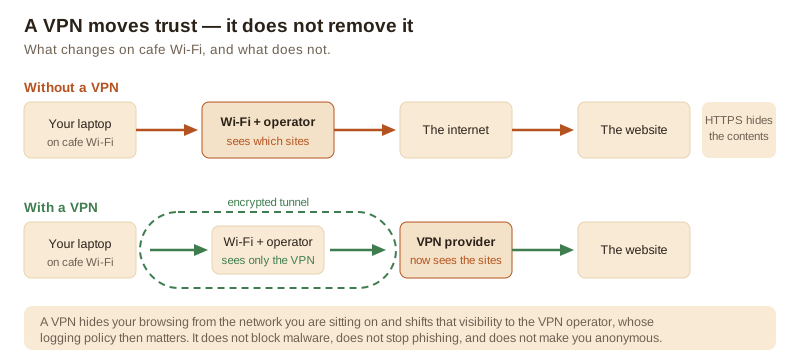
What remains visible to the network you are connected to is metadata: which hostnames you are resolving and connecting to, roughly when, and roughly how much. Not the contents of the page, not what you typed. That distinction is the whole basis for deciding whether a VPN is worth paying for.
What a VPN genuinely gives you
- The local network stops seeing your destinations. The cafe, hotel or airport operator, and anyone else on that Wi-Fi, sees an encrypted connection to a VPN endpoint and nothing more.
- Protection against a hostile or misconfigured local network. Captive portals that tamper with traffic, networks that redirect DNS, and the occasional genuinely malicious hotspot all lose most of their leverage.
- Your IP address is hidden from the sites you visit, which removes the crudest form of location inference and some IP-based tracking.
- Your home internet provider stops seeing your destinations, which in some jurisdictions is the actual reason people use one.
What it moves rather than removes
Your traffic still emerges somewhere. That somewhere is the VPN provider, and it now occupies exactly the position of visibility the cafe used to have. You have not removed the need to trust an intermediary; you have chosen a different one. Whether that is an improvement depends entirely on the provider's logging policy, its jurisdiction, its funding model and whether any of that has ever been independently audited.
This is the reason to be sceptical of free VPN apps in particular. Running a global network of exit servers is expensive. If the product is free, the revenue is coming from somewhere, and the most valuable thing passing through the service is the traffic itself.
What it does not do at all
- It does not block malware. A tunnel carries a malicious download just as faithfully as a clean one. Some VPN apps bundle a blocklist feature; the tunnel itself does nothing.
- It does not stop phishing. You can be persuaded to type your password into a fake page over an encrypted tunnel without any difficulty.
- It does not make you anonymous. You are still logged into your accounts; browser and account-level identification continue as normal.
- It does not stop tracking. Cookies, account logins and browser fingerprinting all work identically through a VPN.
- It does not encrypt what was already unencrypted at the destination. It protects the tunnel, not the far end.
Practical rules for public Wi-Fi
- Check that connections are encrypted. If a browser warns that a site is not secure, take the warning seriously on a network you do not control.
- Turn off automatic connection to open networks. A device that joins any network named “Free Wi-Fi” is making the decision for you.
- Use your phone's tethering when it matters. Mobile data is usually the simpler answer for banking on the move than any VPN subscription.
- Never install a “certificate” a network asks you to install. That is the one action that genuinely does let a network read your encrypted traffic.
- Keep two-factor authentication on, which protects you regardless of what the network can see.
The short version
A VPN is worth having if you often use networks you do not control, or if you have a specific reason to keep your destinations away from your internet provider. It is worth choosing carefully, because you are transferring trust rather than eliminating it. It is not a security product in the sense that an antivirus engine is, and no VPN subscription substitutes for updates, backups and a password manager.
Sources
- Mozilla, HTTPS adoption telemetry: letsencrypt.org/stats
- UK National Cyber Security Centre, guidance on public Wi-Fi and VPNs: ncsc.gov.uk
- ENISA, guidance on secure communications and network threats: enisa.europa.eu